
Cluster Deployment
This document provides detailed configuration steps and best practices for New API cluster deployment, helping you build a highly available, load-balanced distributed system.
Prerequisites
- Multiple servers (at least two, with a master-slave architecture)
- Docker and Docker Compose installed
- Shared MySQL database (master and slave nodes must access the same database)
- Shared Redis service (for inter-node data synchronization and caching)
- Optional: Load balancer (e.g., Nginx, HAProxy, or cloud provider's load balancing service)
Cluster Architecture Overview
The New API cluster adopts a master-slave architecture design:
- Master Node: Responsible for handling all write operations and some read operations
- Slave Nodes: Primarily responsible for handling read operations to improve overall system throughput
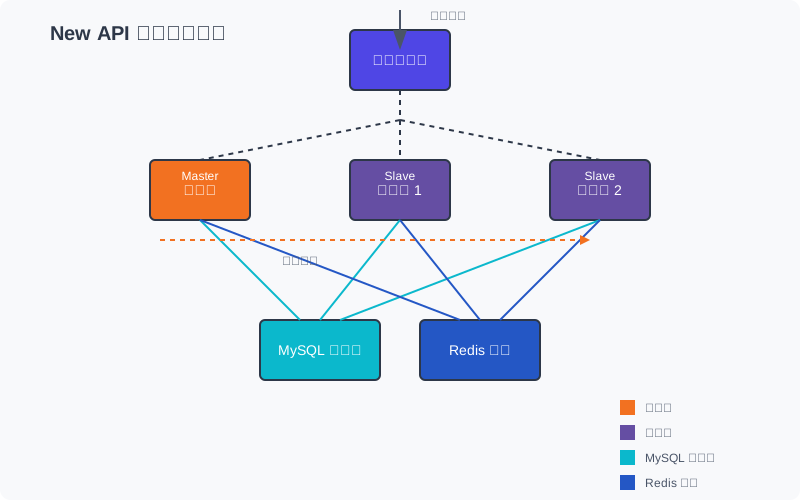
Key Configurations for Cluster Deployment
The key to cluster deployment is that all nodes must:
- Share the same database: All nodes access the same MySQL database
- Share the same Redis: Used for caching and inter-node communication
- Use the same secrets:
SESSION_SECRETandCRYPTO_SECRETmust be identical across all nodes - Correctly configure node type: Master node as
master, slave node asslave
Deployment Steps
Step One: Prepare Shared Database and Redis
First, you need to prepare shared MySQL database and Redis services. This can be:
- Independently deployed highly available MySQL and Redis services
- Cloud provider's managed database and caching services
- MySQL and Redis running on separate servers
For MySQL databases, you can choose from the following architectural solutions:
| Architecture Type | Component Composition | How it Works | Application Configuration Method |
|---|---|---|---|
| Master-Slave Replication Architecture | 1 Master Database N Slave Databases | Master handles writes Slaves handle reads Master-slave data automatically synchronized | Configure master database address as SQL_DSN |
| Database Cluster Architecture | Multiple peer nodes Proxy layer (ProxySQL/MySQL Router) | All nodes are read/write Load balancing via proxy layer Automatic failover | Configure proxy layer address as SQL_DSN |
Important Note
Regardless of the chosen architecture, the application's SQL_DSN configuration only requires a single unified entry address.
Ensure these services are accessible by all nodes and have sufficient performance and reliability.
Step Two: Configure the Master Node
Create a docker-compose.yml file on the master node server:
services:
  new-api-master:
    image: calciumion/new-api:latest
    container_name: new-api-master
    restart: always
    ports:
      - '3000:3000'
    environment:
      - SQL_DSN=root:password@tcp(your-db-host:3306)/new-api
      - REDIS_CONN_STRING=redis://default:password@your-redis-host:6379
      - SESSION_SECRET=your_unique_session_secret
      - CRYPTO_SECRET=your_unique_crypto_secret
      - TZ=Asia/Shanghai
      # 以下是可选配置
      - SYNC_FREQUENCY=60 # 同步频率,单位秒
      # - FRONTEND_BASE_URL=https://<your-newapi-domain> # 前端基础 URL,用于邮件通知等功能
    volumes:
      - ./data:/data
      - ./logs:/app/logs
Security Tip
Please replace the example values in the above configuration with strong passwords and randomly generated secret strings.
Start the master node:
docker compose up -dStep Three: Configure Slave Nodes
Create a docker-compose.yml file on each slave node server:
services:
  new-api-slave:
    image: calciumion/new-api:latest
    container_name: new-api-slave
    restart: always
    ports:
      - '3000:3000' # 可以与主节点使用相同端口,因为它们在不同服务器上
    environment:
      - SQL_DSN=root:password@tcp(your-db-host:3306)/new-api # 与主节点相同
      - REDIS_CONN_STRING=redis://default:password@your-redis-host:6379 # 与主节点相同
      - SESSION_SECRET=your_unique_session_secret # 必须与主节点相同
      - CRYPTO_SECRET=your_unique_crypto_secret # 必须与主节点相同
      - NODE_TYPE=slave # 关键配置,指定为从节点
      - SYNC_FREQUENCY=60 # 从节点与主节点同步频率,单位秒
      - TZ=Asia/Shanghai
      # 以下是可选配置
      # - FRONTEND_BASE_URL=https://<your-newapi-domain> # 需与主节点相同
    volumes:
      - ./data:/data
      - ./logs:/app/logs
Start the slave node:
docker compose up -dRepeat this step for each slave node server.
Step Four: Configure Load Balancing
To achieve balanced traffic distribution, you need to set up a load balancer. Here is a configuration example using Nginx as the load balancer:
upstream new_api_cluster {
    server master-node-ip:3000 weight=3;
    server slave-node1-ip:3000 weight=5;
    server slave-node2-ip:3000 weight=5;
    # 可添加更多从节点
}

server {
    listen 80;
    server_name <your-newapi-domain>;

    location / {
        proxy_pass http://new_api_cluster;
        proxy_set_header Host $host;
        proxy_set_header X-Real-IP $remote_addr;
        proxy_set_header X-Forwarded-For $proxy_add_x_forwarded_for;
        proxy_set_header X-Forwarded-Proto $scheme;
    }
}
This configuration sets the master node weight to 3 and slave node weights to 5, meaning slave nodes will handle more requests. You can adjust these weights according to your actual needs.
Advanced Configuration Options
Data Synchronization Settings
Data synchronization between cluster nodes relies on the following environment variables:
| Environment Variable | Description | Recommended Value |
|---|---|---|
SYNC_FREQUENCY | Node synchronization frequency (seconds) | 60 |
BATCH_UPDATE_ENABLED | Enable batch updates | true |
BATCH_UPDATE_INTERVAL | Batch update interval (seconds) | 5 |
Redis High Availability Configuration
To improve Redis availability, you can configure Redis Cluster or Sentinel mode:
environment:
  - REDIS_CONN_STRING=redis://your-redis-host:6379
  - REDIS_PASSWORD=your_redis_password
  - REDIS_MASTER_NAME=mymaster # Master node name in Sentinel mode
  - REDIS_CONN_POOL_SIZE=10 # Redis connection pool size
Session Security Configuration
Ensure all nodes in the cluster use the same session and encryption keys:
environment:
  - SESSION_SECRET=your_unique_session_secret # Must be identical across all nodes
  - CRYPTO_SECRET=your_unique_crypto_secret # Must be identical across all nodes
Monitoring and Maintenance
Health Checks
Configure regular health checks to monitor node status:
healthcheck:
  test:
    [
      'CMD-SHELL',
      "wget -q -O - http://localhost:3000/api/status | grep -o '\"success\":\\s*true' | awk -F: '{print $$2}'",
    ]
  interval: 30s
  timeout: 10s
  retries: 3
Log Management
For large-scale clusters, a centralized log management system is recommended:
environment:
  - LOG_SQL_DSN=root:password@tcp(log-db-host:3306)/new_api_logs # Separate log database
Scaling Guide
As your business grows, you may need to expand your cluster. The scaling steps are as follows:
- Prepare new servers: Install Docker and Docker Compose
- Configure slave nodes: Configure new slave nodes according to the instructions in "Step Three: Configure Slave Nodes"
- Update load balancer configuration: Add the new nodes to the load balancer configuration
- Test new nodes: Ensure the new nodes are working correctly and participating in load balancing
Best Practices
- Regularly back up the database: Even in a clustered environment, the database should be backed up regularly
- Monitor resource usage: Closely monitor CPU, memory, and disk usage
- Adopt a rolling update strategy: When updating, update slave nodes first, and then update the master node after confirming stability
- Configure an alerting system: Monitor node status and promptly notify administrators when issues occur
- Geographically distributed deployment: If possible, deploy nodes in different geographical locations to improve availability
Troubleshooting
Nodes Cannot Synchronize Data
- Check if Redis connection is normal
- Confirm if SESSION_SECRET and CRYPTO_SECRET are identical across all nodes
- Verify if the database connection configuration is correct
Load Imbalance
- Check load balancer configuration and weight settings
- Monitor resource usage of each node to ensure no node is overloaded
- May need to adjust node weights or add more nodes
Session Loss Issues
- Ensure all nodes use the same SESSION_SECRET
- Verify Redis configuration is correct and accessible
- Check if the client is handling cookies correctly
Related Documentation
- Environment Variable Configuration Guide - Contains all relevant environment variables for multi-node deployment
- System Update Guide - System update strategy in a multi-node environment
- Docker Compose Configuration Instructions - For writing cluster node configuration files
How is this guide?